Over the past two weeks, I tried vibe coding a Mac presentation app as a 3D generalist with almost no traditional coding experience. AI made it surprisingly easy to get a first working version up and running, but refining it, debugging it, and understanding what was breaking turned out to be the real challenge. In the end, it made coding feel far more accessible, even if it also made me realize I’m definitely not a developer.
Intro
I have been working as a 3D generalist for almost seven years. Most of that time has been spent on character creation, animation in Unreal Engine, and prop and environment modeling.
What I am not is a programmer.
Before this, my coding experience mostly stopped at Unreal Engine Blueprints. I understood some of the terminology, but writing standard code from scratch was definitely not my world. Still, I like experimenting with new technology, I enjoy R&D, and I like throwing myself at things I do not fully understand just to see what happens.
So for the past two weeks, that is exactly what I did.
I tried to vibe code a Mac app.
The idea
The app idea was actually pretty practical. I wanted to build a presentation tool for our company. The goal was to simplify making presentations so you would not need to be a designer or scroll endlessly through templates. Ideally, it would let someone like our boss quickly put together something clean and usable without always needing help from the marketing design team.
In my head, this felt very achievable.
I genuinely thought I could vibe code something in a week and be done.
That was optimistic.
Starting with almost no plan
Going in, I thought UI and UX would be the easy part. That is the part I naturally gravitate toward. I expected the hard part to be getting to a functional build that could actually ship.
I started with whatever tools seemed most useful and current: Xcode, SwiftUI, Codex, Cursor, Claude, and a lot of trial and error. I did not really have a full plan. I had an idea, a direction, and a lot of curiosity.
The first day was actually great. It was exciting to try all these tools and see how they worked. There is a very specific kind of energy that comes from opening software you barely understand and feeling like maybe, somehow, you are going to build something real with it.
And surprisingly, that part happened fast.
The first win
The most exciting moment of the whole process was the first time I clicked Run and saw that I had actually made something. With almost no traditional coding knowledge, I had a functional app on screen. It didn't look great but it worked.
That was the moment where vibe coding really sold itself to me. AI was genuinely good at helping with the general setup of the app and getting to an initial version quickly. It helped me get from idea to execution way faster than I expected.
For a moment, it felt like a superpower.
Then reality showed up
The strange thing is that getting to a first functional product was not the hardest part.
The harder part was everything after that.
The more I kept working on the app, the more complicated it became to prompt the AI clearly enough to get meaningful changes. As the context got larger, waiting times increased. The responses got slower. Sometimes the AI would spend ten minutes generating code, burn through credits, and come back having changed basically nothing useful.
That got frustrating pretty fast.
The real issue was not just the tooling. It was the gap between what I wanted, what I thought I was asking for, and what the AI actually understood. Coming from a design background, I approached it from a UX perspective, not like a developer. I could describe how something should feel or behave, but that did not always translate into precise technical instructions.
And when something broke, I usually had no idea why.
That was easily the most frustrating part: not understanding what broke.
Feeling completely out of my depth
One thing that surprised me was how little of my 3D background transferred directly.
Switching from Blender to Maya, for example, is annoying, but not terrifying. You still understand the general workflow. You know what kinds of tools you are looking for. You know how the logic of the software probably works.
Going into Xcode and code editors felt completely different.
I felt like I knew nothing.
In 3D, even when a pipeline gets technical, I still have instincts. In coding tools, I had almost none. I was constantly guessing. I was not just learning a new program. I was learning a new way of thinking.
That was humbling.
Where AI was good, and where it really was not
After about 100 hours over two weeks, I came away with a pretty clear feeling about what AI is good at in this kind of workflow.
It is great at helping you start.
It is great at scaffolding.
It is great at getting a first version of an idea into existence.
Where it gets much weaker is iteration. Small fixes. Refinement. Creating a cohesive UI purely from prompts. Understanding subtle intent. Those parts were much harder than I expected.
One feature in particular gave me a lot of trouble: automatic text distillation into cards. Getting that to work in a decent way while keeping costs low was difficult, and it is still one of the weaker parts of the app.
So the biggest wrong assumption I made was probably this: I thought AI would be able to figure everything out purely from prompts.
It absolutely cannot.
At least not in the way I imagined.
The breakthrough
One of the biggest turning points came when I started learning about agents and using a plans.md style workflow.
That made a huge difference.
Up until then, a lot of my prompting was reactive. I was basically trying to steer the app through conversation alone. Once I started giving the AI more structure, the whole process improved. It did not suddenly become easy, but it became more manageable.
That was probably the moment where something clicked for me.
Not in a “now I am a coder” kind of way.
More in a “okay, I see how to work with this” kind of way.
What I ended up with
/uploads/library/2026/08/c477c43b-ae2d-4050-b7a5-dfb14dae6407-screenshot-2026-04-10-at-15-27-26.png
By the end of the two weeks, I had something usable.
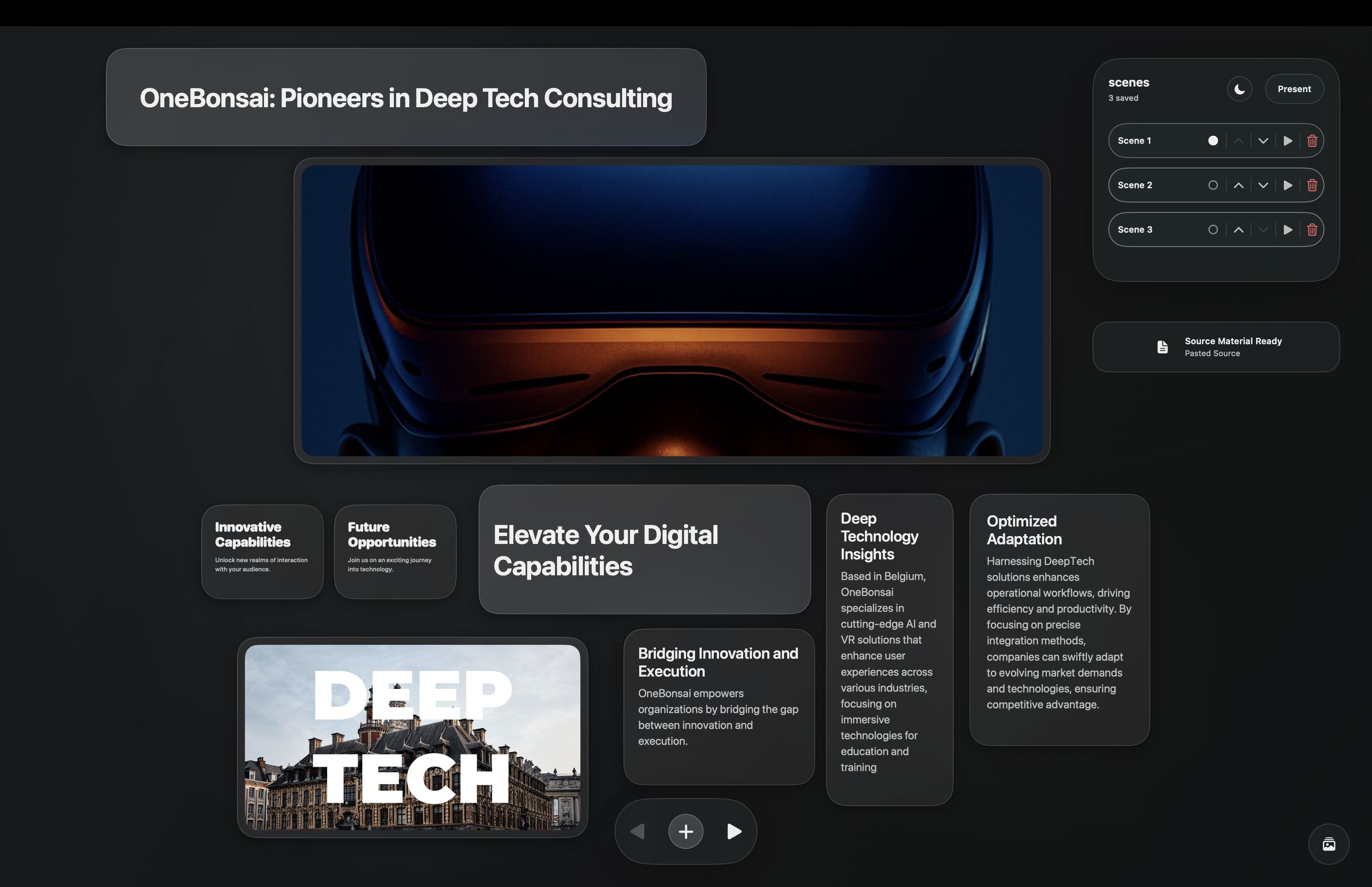
The app supports an infinite canvas, creating cards with prompts, scene transitions, styling, adding images, and most of the features I originally wanted. It is not perfect, and some AI-related features still need work, but it is definitely more than just a prototype.
It works.
That honestly still feels a bit absurd to say.
Am I proud of it? Yes, absolutely.
Even if I do not feel like I “made it myself” in the traditional coding sense, I still shaped it. I directed it. I pushed through the bad prompts, the broken builds, the confusing errors, and the moments where nothing seemed to change except my credit usage.
That counts for something.
What I learned
The biggest thing I learned is not that I secretly want to become a programmer.
I do not.
If anything, this process confirmed that I am not a coder.
But it also taught me that coding is much more accessible than I thought. Not easy, not frictionless, and definitely not magic, but accessible enough that someone like me could build a usable app in two weeks with the right tools and enough persistence.
I also learned how to think a little more clearly about problems. I got better at identifying where issues might come from and how to prompt around them. That alone changed the experience a lot.
And maybe most importantly, I was reminded that trying something new is fun. Being bad at something new is fun. Letting your imagination run ahead of your skill level is fun.
That is a feeling worth protecting.
Final thoughts
If you are an artist or designer and you have been curious about trying something like this, I think it is worth doing.
Not because AI will magically turn you into a software engineer.
But because it opens doors. It lets you test ideas you would have dismissed before. It gives you a new way to prototype, experiment, and think.
You will probably get stuck.
You will probably confuse the AI.
The AI will definitely confuse you back.
But you might still end up with something real.
And even if the result is messy, that is still a pretty incredible place to start.